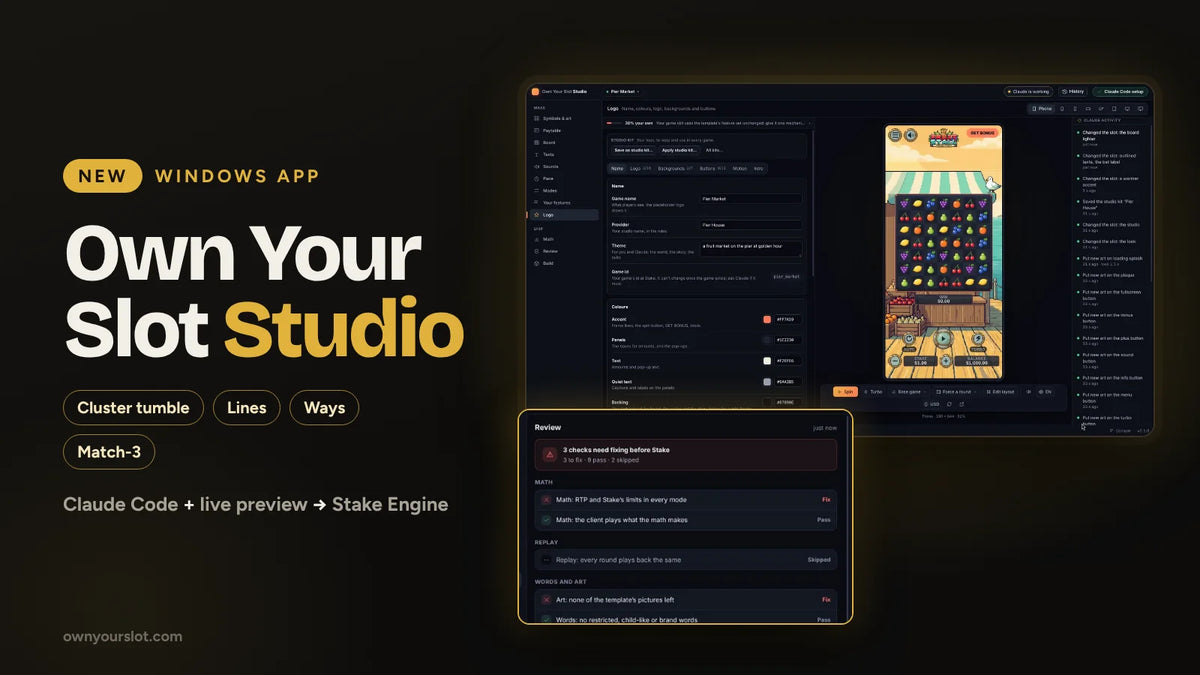
Want to make your own slot game without coding? Today we are launching Own Your Slot Studio, a Windows app that lets you build a slot for Stake Engine with your own Claude Code beside you. You pick a template, describe what you want in plain words, and watch the slot change in a live preview, on a desktop frame and a phone frame, while Claude does the work.
The short answer: Own Your Slot Studio is a slot builder for Stake Engine. Four templates (cluster tumble, lines, ways and match-3), Claude Code connected with one button, hand editing for everything players see, a live RTP estimate in every mode, a review with a fix list, and one button that builds the folder you upload. Launch price $149 (regular $199) until November 28.
We built it because it is how we wanted to make our own games: one window, the game always running, and no terminal. Here is what it does, who it is for, the 6 steps from idea to upload with real screenshots, how it compares with our guide and our done-for-you slots, and the honest limits.
What is Own Your Slot Studio? A Stake Engine slot builder

Making a slot for Stake Engine used to mean a stack of SDKs, a Python math pipeline and a lot of terminal work. The Studio puts all of it in one desktop app. The engine, the math, the preview, the checks and the upload folder are set up for you the first time you open it, with one progress bar and no questions.
Then you work two ways, and you can mix them freely:
- With Claude Code. You connect your own Claude Code to the Studio once. Claude sees the same slot you do, plays rounds, reads the problems and makes changes. Every step it takes shows up in the Claude activity panel, and the preview updates while you watch.
- By hand. Symbols and art, texts, paytable, board, modes, logo and colours, sounds: every panel works without Claude. Every change, yours or Claude's, is a step in History you can undo.
New to the platform itself? Our beginner's guide to Stake Engine explains how it works in plain words.
Who this is for
- New entrepreneurs who see Stake Engine as a business and want a first game without hiring a studio.
- Side hustlers with evenings and weekends, who want to see progress every session instead of fighting setup.
- Creators and artists who already have a look, a theme or an audience, and want it on a real, playable slot.
- Builders who tried the code route and want the engine, the math and the checks in one place.
It is not for you if you need a Mac today, if you want a finished game without doing any of the work (see the done-for-you option below), or if you are looking for a guaranteed income. Nobody can promise that, and we don't.
From idea to Stake Engine in 6 steps, without coding
1. Pick a template and name your slot

Press New slot and pick one of four templates: cluster tumble, lines, ways or match-3. Each one is built from one of our own Stake Engine games with the theme taken out, so you start from a game that already works. Give it a name and a theme (a few words about its world), choose the board size, the RTP and the max win. The defaults already sit inside Stake's limits (96.5% RTP, in Stake's 96.0 to 96.7% range). Press Create slot and it plays in the preview in under a minute.
2. Connect Claude Code and ask in plain words

Press Connect Claude Code. The Studio sets everything up and shows three ticks. Then ask for what you want in your own words: "a wild that spreads to its neighbours", "ten free spins from three scatters", "make the board lighter and the accent warmer". Claude works through more than 40 Studio tools, and the Help page has prompts that have each been tried on a real slot, ready to copy. New to Claude? Read how to make a slot game with Claude Code.
3. Make it yours by hand

Drop your own art on every symbol and scene. Edit every word players read: each one is checked against Stake's social-mode word list as you type, and can be translated into any of Stake's 16 languages. Change the paytable, the board size, the bonus modes, the logo and colours, the buttons and the sounds. Switch between phone, tablet and desktop frames, and force a round to see the bonus or a big win on demand, without spinning for it.
4. Get the math right
The math is what makes a slot fair and what Stake checks first. The Studio shows a live RTP estimate in every mode while you edit, against Stake's limits. If a change pushes a mode off target, Balance for me proposes new pays and weights to bring it back, and a quick simulation shows the result before you keep it. When the game is ready, one full math build runs with an estimate first, progress, cancel and resume. The review then reads every mode's RTP and max win from your own full build.
5. Review it before Stake sees it

Press Run the checks under Review. The Studio looks at your game the way Stake's reviewers do: the math against Stake's limits, every word players read, art still left from the template, the layout at every size Stake reviews, and everything Stake requires on screen. Each check passes, warns or fails, and says why and what to do.
For the last stretch there is an optional rating rehearsal: Claude Code plays your game as three reviewers and scores it the way Stake does, giving you a score out of 3 and a fix list. It uses a large share of your Claude allowance, so run it when the game is nearly done. Stake's real review works the same way: three reviewers each score out of 3, and a game is published at 6 points out of 9 or more. We explain it in detail in how Stake Engine reviews a slot.
6. Build for Stake and upload

Press Build for Stake. The Studio makes the folder Stake Engine's upload page asks for: the game, the math, the cover and tile art, and a short upload guide. It refuses while placeholder template art remains or the math is out of date, so what you upload is your game and your build. You upload it yourself, from your own Stake Engine account. The Studio never uploads anything for you.
What happens after you upload
Stake Engine (now called Engine) reviews your game and rates it. Once it is live, you earn a share of what the game makes from players' bets: 10% of its gross gaming revenue each month under the launch terms. What a game earns depends on the game itself, on how much it is played and on your own marketing. Some games earn very little. Our guide to what a slot costs to buy or build puts the numbers side by side.
Studio vs the guide vs done-for-you
| Own Your Slot Studio | The Own Your Slot Guide | Done for you | |
|---|---|---|---|
| What it is | A Windows app: templates, live preview, Claude Code, review and the upload folder | The full method: every step and prompt, from idea to published slot | We build a new slot for you, with full rights |
| Price | $149 at launch (then $199) | $99 | $599 (Made-to-Order) or $799 (Custom Slot) |
| Where you work | On your Windows PC | Anywhere: Claude Code in the cloud, even from your phone | Nowhere: we deliver in 14 days |
| You need | Claude Code with your Claude plan, your own art | A Claude plan, a GitHub account | A Stake Engine account to publish |
| Best if | You want to see your slot running from minute one and change it by hand or with Claude | You want to learn the whole craft and build any mechanic | You would rather have a finished game |
They work well together: the guide teaches you why each step matters, and its Edition 1.2, out today, has a new chapter on the Studio. Want a game built for you instead? See our Made-to-Order Slot and Custom Slot.
The honest limits
- Windows only, for now. Version 1 runs on Windows (64-bit). There is no Mac version yet.
- You need Claude Code. Working with Claude needs your own Claude plan, a paid product with its own terms. Everything by hand works without it.
- Internet the first time. The installer is about 206 MB; on first run the Studio sets up its engine (about 2 GB of disk).
- Windows shows a warning. The installer isn't signed yet, so Windows says "Windows protected your PC" the first time. Press More info, then Run anyway.
- Bring your own art. The Studio is not an image generator. The template art is there to show the slot working, and Build for Stake refuses it.
- New mechanics take iterations. The panels cover each template's settings; anything truly new is written by Claude in code, and you test it in the preview.
- Stake decides. The checks and the rehearsal help you send your best version, but they can't promise approval or earnings. Slots are for players 18 and over.
Launch price: $149 instead of $199, until November 28, 2026 at 11:59 PM Eastern.
- Own Your Slot Studio: $149. Free 1.x updates. Your licence code arrives in your order email, the installer in your download email.
- The Starter: $199. The guide (Edition 1.2, with the new Studio chapter) and the Studio.
- The Full Suite: $349 instead of $746 separately. The guide, the Studio, LLM2D for animation and LLMdB for sound.
Compare every option on the bundles page, or start with the guide alone. Not sure yet? Start here.
Frequently asked questions
Can I really make my own slot game without coding?
Yes. You start from a working template, change the art, words, paytable, board, modes and sounds in the panels, and ask Claude Code in plain words for anything new. You never need to open a terminal.
What do I need to use Own Your Slot Studio?
A Windows (64-bit) computer, Claude Code with your own Claude plan, your own art for the symbols and scenes, and a Stake Engine account to upload the finished folder.
Does Own Your Slot Studio work on a Mac?
Not yet. Version 1 is for Windows (64-bit) only.
Will Stake approve my game?
Stake decides. The Studio builds exactly what Stake Engine's upload page asks for and runs the checks we can run, with an optional rating rehearsal that gives a score out of 3 and a fix list, so you send your best version. Nobody outside Stake can promise approval.
How do creators earn money on Stake Engine?
Publishers earn a share of what their game makes on Stake: 10% of the game's gross gaming revenue each month under the launch terms. It depends on how much players play the game and on your own marketing, so no amount is promised.
Should I get the Studio or the guide?
The Studio is the fastest way to see your slot running and change it by hand or with Claude. The guide teaches the whole method and every prompt, for any mechanic, even from your phone. The Starter bundle gives you both for $199.
How long does the launch price last?
The Studio is $149 instead of $199 until November 28, 2026 at 11:59 PM Eastern.
Want to go deeper? Read why Stake Engine is Roblox in 2008 and how to make a slot game with Claude Code.
Claude and Claude Code are products of Anthropic. Own Your Slot is an independent studio and is not affiliated with Anthropic, Stake or Engine. 18+. Gamble responsibly.